


Building a website for your business can feel intimidating, especially if you’re a therapist whose expertise lies in helping people, not figuring out domains, design, and tech tools. But with the right approach and information, creating a welcoming, professional and client-attracting website for your practice can be easier, and I’m here to guide you through it.
This post contains affiliate links, which means I gain a commission at no cost to you if you decide to make a purchase through these links.
Step 1: Get Clear on Your Website Goals (Before You Start Anything Technical)
This is an important first step you should do before you think about choosing a platform, picking fonts & colours, or other technical aspects. Your website is your digital office and is often the first impression potential clients have of you and your practice. So what do you want your website to achieve for both you and your potential clients? What do you want people to feel or do when they land on your website?
Take some time to brainstorm and write down your website goals. This would guide you on how you’ll design your website, from the vibe to the copy, colour palette, images, etc. You want your website to quietly answer questions potential clients may have like: “Can I trust this person?” “Do they understand what I’m going through?” and“What is their approach, and how do I get started?”
Are you focusing on individual therapy, couples counselling, or a niche like anxiety, trauma, or career burnout? Are your sessions online, in-person, or both? How many pages will your website have? These are some of the things you plan out as you get clear on your website goals. Your website should make it clear what you do and should be a safe, inviting digital space where clients can learn about your services and feel confident reaching out to you.
📍Tip: You don’t need to have a lot of pages for your website, especially if you’re starting out. You can even start out with a one-page website and add on more pages as your business grows. The main goal is to have a website that tells people what you do, how you can help them (your services), and lets them contact you and book a session.
Step 2: Pick A Domain Name
Your domain name is your web address, and ideally, it should be easy to remember and aligned with your practice. Many therapists use their own name (e.g., janedoetherapy.com), or the name of their practice for easy recognition, while others add in the state they operate in or their niche into their domain names (eg., speechtherapistvancouver.com).
You can think up different variations and go with the one that works for you. Be sure to keep it simple, avoid complicated spellings, and try to stick with a “.com” if possible, although other options like “.therapy” or “.org” can work just as well.
Once you’re sure of your domain name, you’ll need to purchase the domain from a domain registrar like Namecheap, Lyrical Host, Porkbun, etc.
Step 3: Choose a Website Platform That Works For You
There are so many website platforms out there that you can use to build a therapist website, each with its own pros and cons, and it’s easy to get confused about which to choose. My advice would be to focus on your website goals and choose a platform that is easy to set up, has good templates that you can start with, and has built-in features like contact forms or booking pages, or allows you to easily integrate such into your website. Here are a few popular website builders to consider;
Showit
Showit is a great choice for service providers and small businesses. Its intuitive drag-and-drop builder makes it easy to create a polished, fully customizable website without any coding knowledge. It also integrates seamlessly with WordPress for blogging, which is great if you plan to use blogging as part of your marketing strategy. It’s beginner-friendly, so you can easily set up your website and update it as your business grows without feeling overwhelmed.
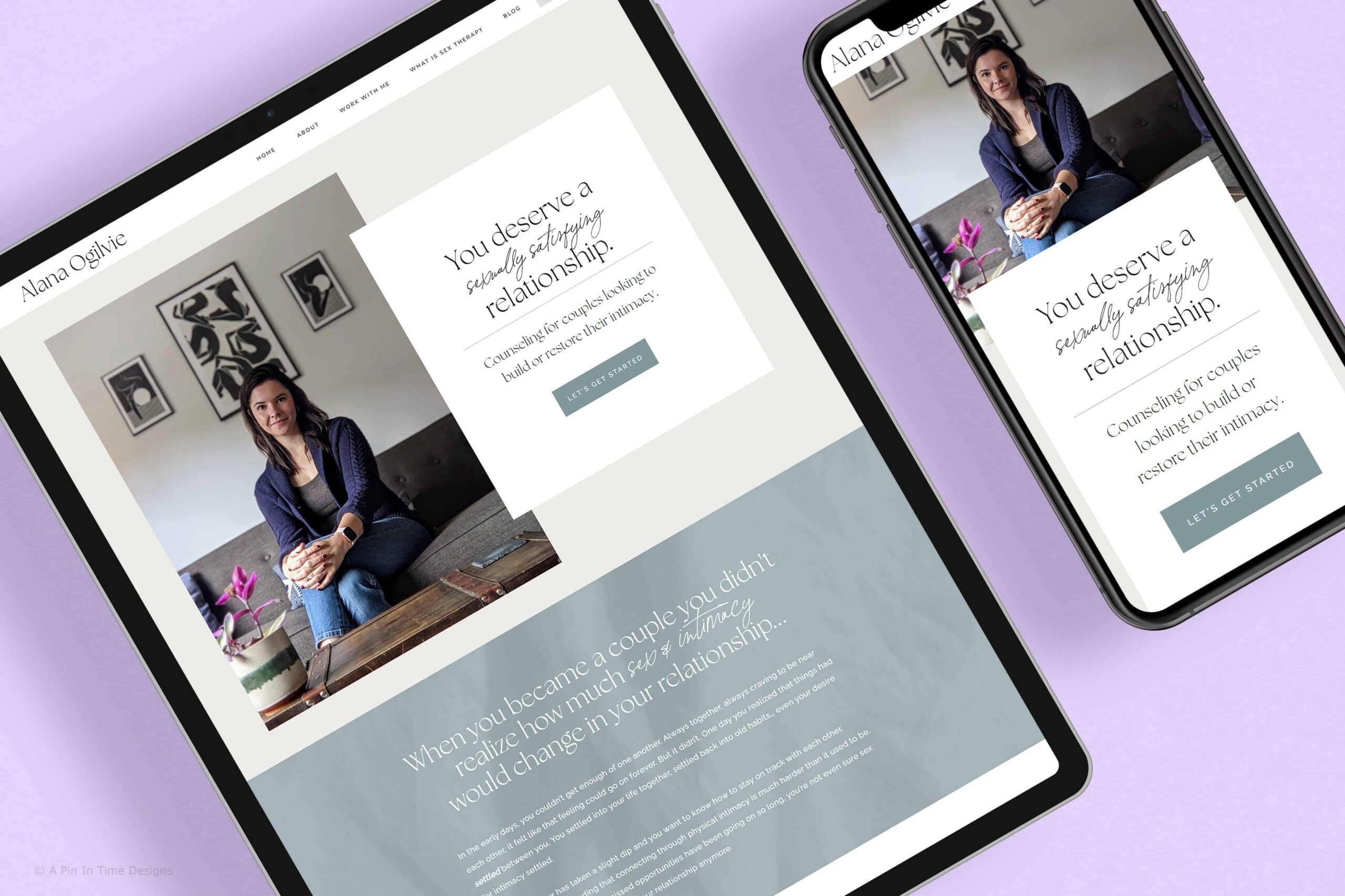
Showit has great customer service, and you also get website hosting with your Showit subscription, so you don’t have to pay for that separately. Here are some therapist/mental health websites I’ve designed with Showit – Alana Ogilvie, Vancouver ADHD and Mood Clinic.
📍Sign up for a 14-day free trial of Showit to test out the website builder. If you sign up with my referral link or code 17z676vn, you also get one free month of Showit when you subscribe after the free trial ends.
Squarespace
Squarespace is another good website builder known for its clean templates and all-in-one approach, which makes it appealing for beginners. Its interface is relatively easy to use, and you can get a professional-looking site up fairly quickly.
However, customisation is more limited compared to platforms like Showit, which can make it harder to fully customise your website without having some coding knowledge. It comes with in-built e-commerce, scheduling and email marketing features (depending on the plan you purchase) and is pretty low maintenance. You can sign up for a two-week trial to test it out and see if it works for you.
SimplePractice
This is a platform made specifically for therapists and wellness professionals. It’s primarily a practice management tool, offering features like appointment scheduling, client portals, billing, and a website builder.
You can create a simple, functional site that connects directly to your booking system, making it easy for clients to schedule sessions. However, the design and customisation options are quite limited compared to dedicated website builders.
WordPress.org
WordPress is a very robust website platform and one of the most used in the world. It offers unmatched flexibility and scalability; you can build virtually any type of website, from a simple therapy practice site to a content-rich platform with advanced features. But this can be overwhelming for beginners as it has a steeper learning curve and doesn’t have direct customer support. You’ll need to manage themes, plugins, and hosting, which can feel technical at first.
On its own, it’s not so easy to fully set up and customise a website without some coding knowledge, so you’ll need to use website builder plugins like Elementor or Kadence to get more customisation flexibility, or purchase a theme.
WordPress is a free and open source platform, so you pay for your domain and web hosting separately and set up your WordPress dashboard. For WordPress sites, it’s important to get your hosting from a great company that offers support in case of any issues, like Lyrical Host*.
PS. WordPress.org is different from WordPress.com.
📍Related Post: The Best 12 Free WordPress Plugins
Step 4: Create Your Brand Elements and Website Copy
Based on the website plan you made in step 1, you’ll start working on your brand elements (colour palette, a simple logo, website font) and the copy for your website, as well as the images you want to use for your website. Here are some tools/resources to help you out with this.
- Coolors: a colour palette generator
- Google Fonts: a huge directory of free fonts you can use for your website.
- Unsplash: free stock photos
For fonts, you’ll need at most 2 – 3 fonts. One for your headers that’s distinct from the others, another for paragraph & sub headings, and another one for accent text (optional). Same for your colour palette, don’t overwhelm yourself by trying to have a wide colour palette. 2-3 colours work, one for buttons, one for backgrounds, and another for accents, plus black and white which are used for text and backgrounds as well.

Get a step by step process for building and launching a website for your business!
If you don’t know where to start when it comes to building a website, or you do know but you feel overwhelmed, this checklist is for you. Get a straightforward view of the process and stay organised as you build your website with this interactive checklist and resources
Fonts and colours influence the vibe of your website. If you’re going for a calming or minimal vibe, there are neutral or calming colours that work well with that. If you want a more playful vibe, you might go for brighter colours and playful fonts.
Since you’ve planned out how many pages you want for your website, you can start working on the copy as well. If you want to start out with a one-page website, that’s a good plan as well, so you’ll not have much copy to write.
There are a lot of resources online to help you out with crafting great copy for your website. Try not to put too much technical terms on your website; remember, you’re trying to connect with prospective clients who might not know all the therapy terms or qualifications. They just want to know how you can help them, so making it as easy as possible for them is key. Make sure your website copy is clear and concise.
📍Tip: You can start out with 4 – 5 core pages, and add on any more as necessary when your business grows. The core pages are home, about, services and booking/contact page. You can add on a FAQ and Insurance page as well. Of course, you’ll need a privacy policy page as this is a requirement for every website.
Step 5: Build Your Website
Now that you’ve chosen a website builder and your domain name, it’s time to start building your website. Depending on which builder you choose, you’d probably start with a template/theme so you’re not building from scratch. There are a lot of templates out there, so look for one that’s well-designed and a good fit for your therapy practice.
Customize it with your colour palette, images and copy to create a website that properly reflects your practice and expertise. Add in any scheduling or client portal integrations as needed. You also want to make sure your website is optimised for mobile, so those viewing it on their phones have a good experience.
Another thing to watch out for is search engine optimisation, you want your website to show up on website searches and be accessible. This can be done through adding keywords to your website, adding alt titles to images, making sure your website doesn’t load slowly, properly using text tags, etc. Most website builders have built-in tools to help with this, so do your research.
Step 6: Launch Your Website!
Congrats, you’ve now built a website for your therapy practice. After making sure everything is in place and your website works properly on mobile and desktop, it’s time to click publish and start promoting your website. Make sure to add a link to your website on any platform you’re active (eg, your Google Business page, your social media platforms, etc.), even on your business card. Tell people in person at networking events, you’ve built your website, now it’s time to get eyes on it.
As your business grows, you can update your website with any new information, add on more pages or start creating blog posts to further market your business. This is why an easy-to-use website builder like Showit is a good choice, so you can easily make updates in the future.
Alternatively, You Can Work With A Website Designer
Instead of figuring everything out on your own, you can work with a website designer, someone who understands both the technical side of building a website and the strategy behind what actually works. You can focus on your business while the website designer creates a website that not only looks good, but is strategically built to support your practice and help you better connect with prospective clients.
A website designer can create a totally custom website from scratch for your practice or expertly customize a website template into a great website for your business. I’ve had the pleasure of designing several Showit websites for therapists and mental health clinics. Here are some of them.
💻 Alana Ogilvie – Couples & Sex Therapist
A minimal and calming website built for a couple’s & sex therapist. She had a previous website built on a platform that was hard for her to update, and it didn’t showcase her expertise well. I customized a Showit template into a strategic and stunning website for her practice. The results – more inquiries sent in and visitors spending longer on her website, with positive comments from her clients.
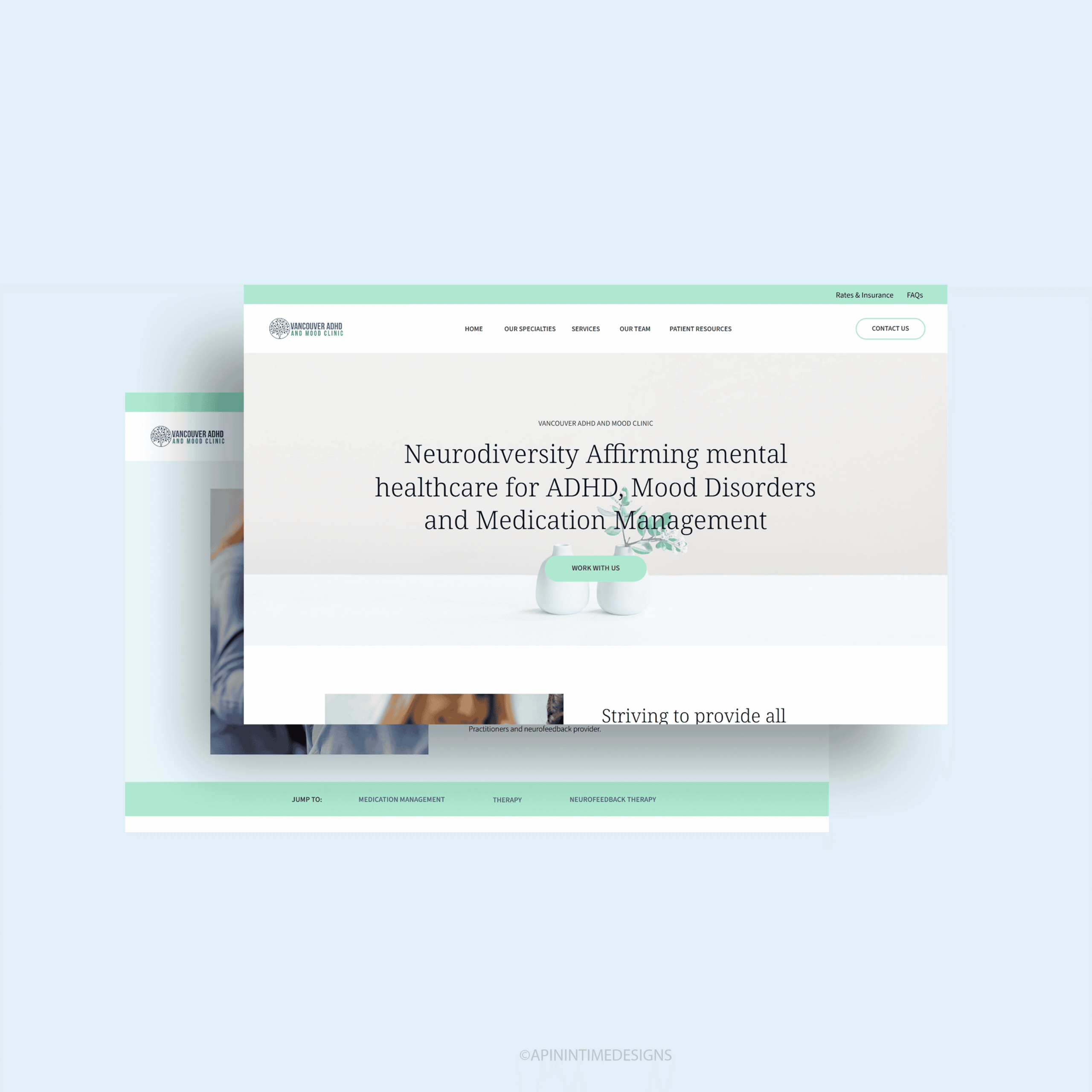
Vancouver ADHD and Mood Clinic
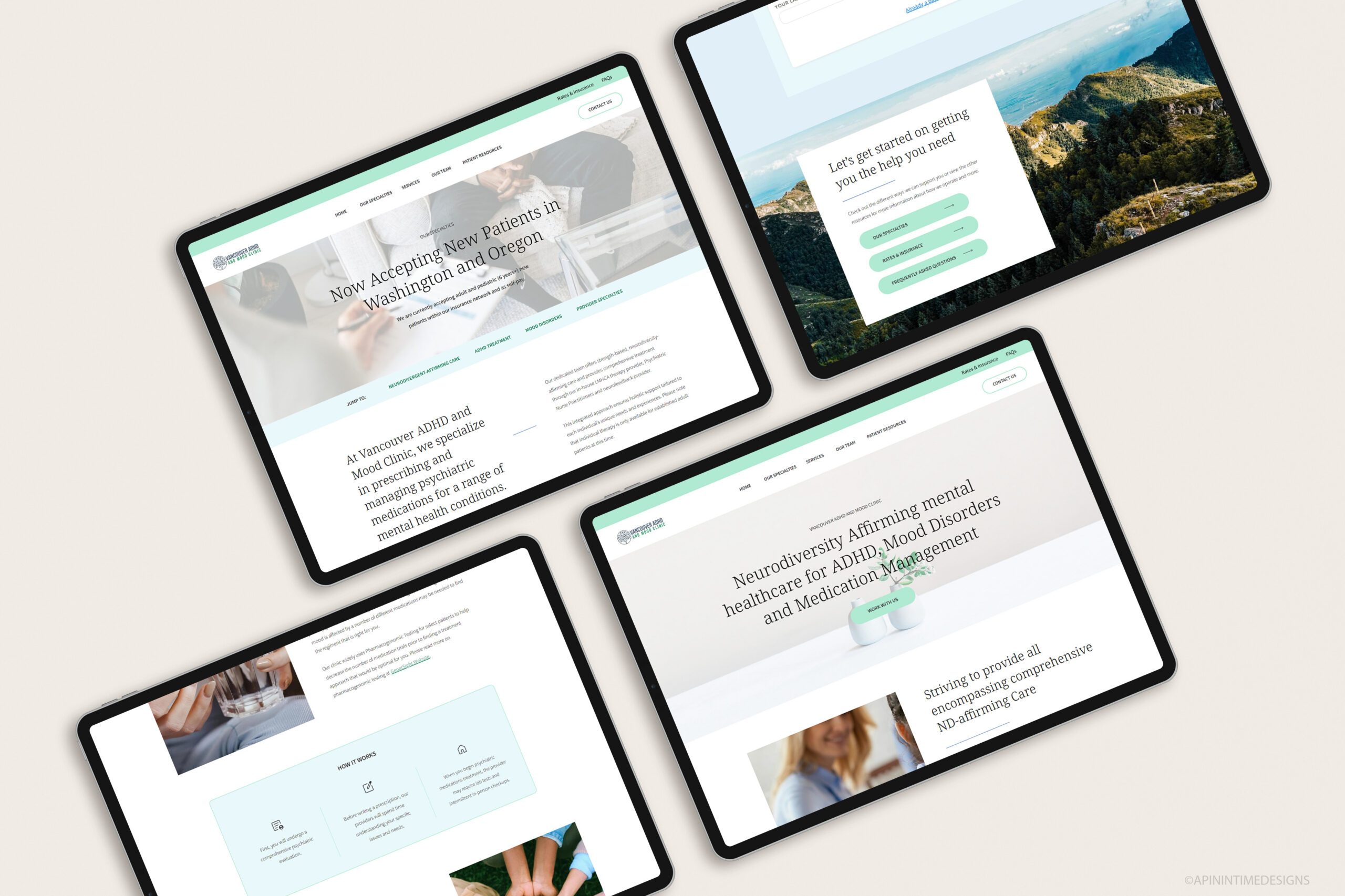
I designed a fully custom website for an ADHD & Mood clinic on Showit. With pops of different shades of green, a minimal font, and well-designed pages, this website showcases their services and approach in the best way. They got lots of positive feedback from their providers and patients about the new website after it was launched.
Building A Website For Your Practice Doesn’t Have To Be Overwhelming
I hope this blog post has made the process a bit clearer. Creating a website for your practice is important in today’s world as it can help build trust and make it easier for you to connect with those who need your services.
If you’re feeling unsure about what to do next, you don’t have to figure it out on your own. Whether you want a fully custom website designed for your practice or a website template customized into a strategic & stunning website for your practice, I’m here to help through my website design services.
I specialise in designing high-converting websites tailored specifically for service professionals like therapists, combining clean design, strategic messaging, and user experience that turns visitors into clients. Let’s bring your vision to life and build something that works for you and your audience.


